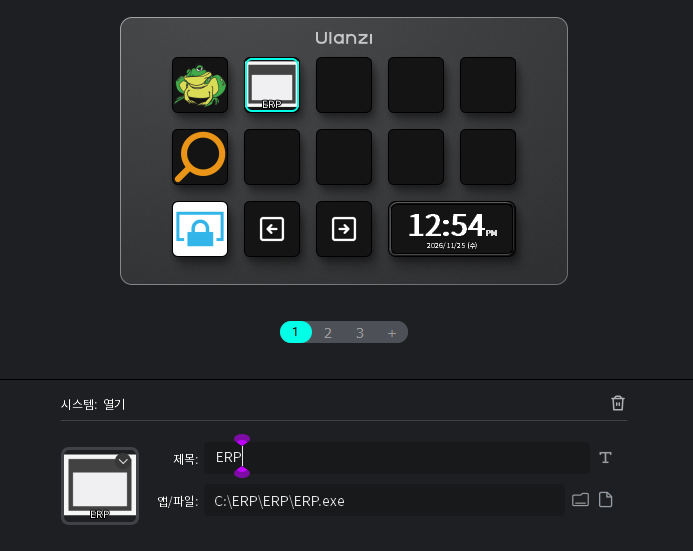
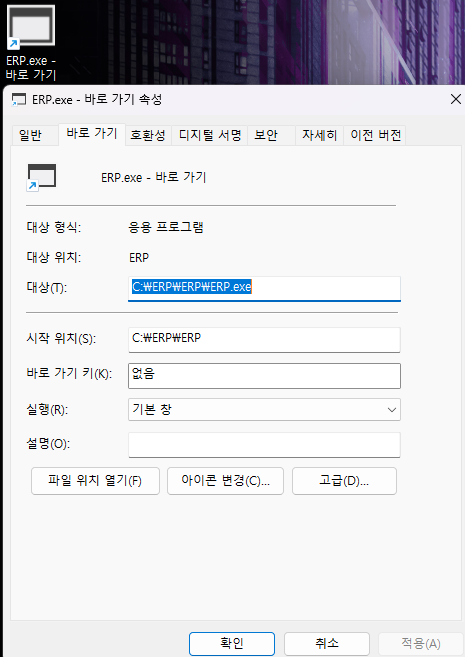
Hello, regarding your issue that non-commercial applications cannot be opened within a folder, we need to confirm the following:
1. What is your computer’s operating system?
2. Can you open the application normally outside of the folder?
3. What specific file format is the non-commercial application you’re trying to open? Would it be possible to provide a screenshot and the file format (with sensitive information redacted) so we can verify the issue?
Please confirm the following:
1. After installing the ERP.exe program, right-click the desktop icon, select “Properties,” and take a screenshot.
2. Open the plugin in Ulanzi Studio, click the button, configure the path, and take a screenshot.
 English
 简体中文
 繁體中文
 한국 사람
 日本語
 Deutsch
 русский
 بالعربية
 TÜRKÇE
 português
 คนไทย
 french


 发表于

 发表于