简体中文 繁體中文 English 日本語 Deutsch 한국어 بالعربية TÜRKÇE português คนไทย Français

Ulanzi StudioCreator tool community

 找回密码
 立即注册
查看: 2352|回复: 13

【插件教程】Ulanzi D100H Dial 控制 Lightroom Classic 教程:修图效率翻倍指南

[复制链接]

87

主题

442

回帖

1839

积分

管理员

积分
1839
发表于 2025-12-25 16:52:22 | 显示全部楼层 |阅读模式
Ulanzi D100H Dial 控制 Lightroom Classic 教程:修图效率翻倍指南


一、介绍
你是否还在为 Lightroom 修图时的 「切换焦虑」 烦恼?
- 翻菜单找「调整画笔」要 3 步?
- 记不住「HSL 颜色切换」快捷键?
- 滚轮调「曝光 / 阴影」精度差、效率低?
本教程帮你用Ulanzi Dial 搭配专属 Lightroom 插件,实现「手不离设备」的沉浸式修图 —— 不用摸键盘、不用点鼠标,7个按键 + 1 个旋钮搞定90% 高频修图操作,效率直接提升 30%+!


二、前置准备
在开始前,请确保你已经完成以下准备:
1、Ulanzi Dial 设备:蓝牙已连接
2、Ulanzi Studio软件:已安装,V2.1及以后版本;
3、Adobe Lightroom Classic 桌面版软件:已安装,建议最新版;


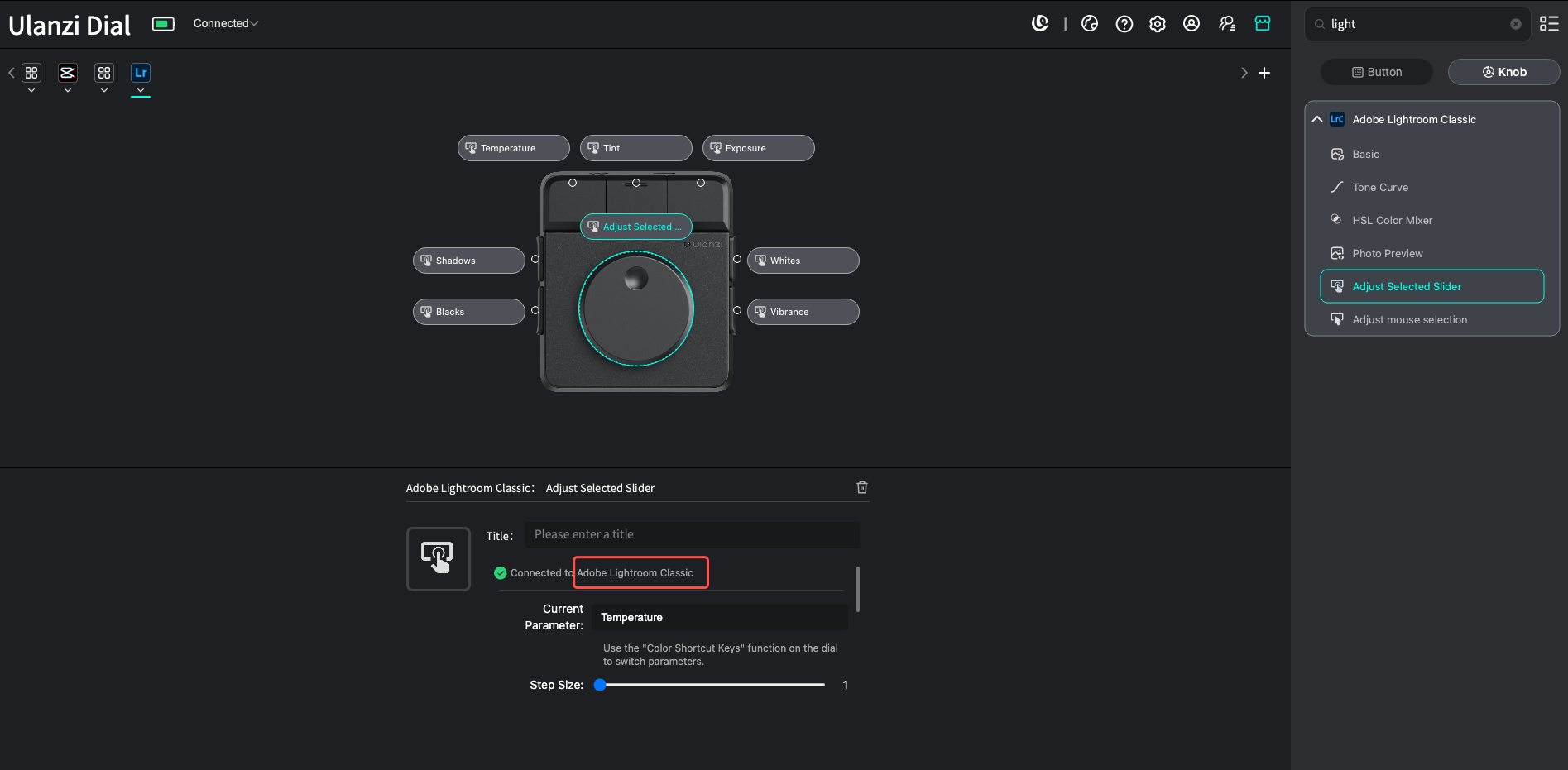
三、安装"Adobe Lightroom Classic"插件
- 启动Ulanzi Studio,点击右上角的“应用商店”,搜索"Adobe Lightroom Classic"插件并下载安装。

四、核心功能操作

lightroom for Dial.gif lrm调色.gif

五、常见问题


1,初次安装App启动后,插件识别不到Lightroom Classic?
解决办法:重新一下Lightroom Classic App

2,Mac OS系统,Lightroom Classic 增效管理器中找不到 Ulanzi 插件,可以尝试以下两个方法:
方法一:手动添加插件
(1)在Lightroom Classic中打开 “文件-增效工具管理器”, 再打开的窗口中,点击左下角的“添加”。
(2)选择插件目录:~/Library/Application\ Support/Ulanzi/UlanziStudio/plugins/com.ulanzi.AdobeLightroomClassic.ulanziPlugin/plugin
(3)选择ulanzi.lrplugin
(4)重启一下ulanzi studio 和 Lightroom Classic

方法二:手动给 Adobe 目录权限
(1)打开“终端”,运行指令:sudo chmod -R 755 "$HOME/Library/Application Support/Adobe/Lightroom/Modules"
(2)输入mac密码,输入密码不会有显示,输完enter即可
(3)运行指令:sudo chown -R $(whoami) "$HOME/Library/Application Support/Adobe/Lightroom/Modules"
(4)重启一下ulanzi studio 和 Lightroom Classic


0

主题

1

回帖

6

积分

新手上路

积分
6
发表于 2026-4-13 23:27:06 | 显示全部楼层
Hello!

Could the dev team adjust more functions for Lightroom?
Example:
1. Click and hold button(long press) + knob = new function (example adjust temp)
2. Click and hold button(long press) + knob= crop + angle
For now, there is no button for long-press or hold in Lightroom.
Hope you will update soon.

87

主题

442

回帖

1839

积分

管理员

积分
1839
 楼主| 发表于 2026-6-16 10:32:52 | 显示全部楼层
sinnguyen 发表于 2026-4-13 23:27
Hello!

Could the dev team adjust more functions for Lightroom?

You can visit the official website to download the latest version of the Ulanzi Studio app, as well as the latest version of the Lightroom Classic plugin, to see if they meet your needs.
If you're looking for keyboard shortcut-related features, you can try the “Multi-Action” shortcut;
As for the long-press function for keyboard shortcuts, you can try it in the new version to see if it meets your needs.

0

主题

2

回帖

16

积分

新手上路

积分
16
发表于 2026-7-17 23:12:14 | 显示全部楼层
管理员你好~

在用D100h时遇到几个问题(lightroom软件)
1.旋钮的精度无法调节,许多数值(如混色器内值)默认转动一格调整量为5,这样不太时候精细调整,能否调整为1或者给一个可以自定义的值以更好满足使用需求。
2.旋钮按下的按键没法设置(将旋钮设置为调整滑条鼠标指向的),如果可以将按下旋钮调整为恢复本指向值的初始值,这样会更符合使用逻辑,或者可以给自定义。
3.旋钮按下旋转与不按下旋转没有区别,也无法设置其他更多功能。如可以设置为大值快速增减 也许会更易使用。按下旋钮再旋转每格增减10或20的值。

期待你的回复

87

主题

442

回帖

1839

积分

管理员

积分
1839
 楼主| 发表于 2026-7-20 09:32:54 | 显示全部楼层
phil01 发表于 2026-7-17 23:12
管理员你好~

在用D100h时遇到几个问题(lightroom软件)

您好,需求已经提交给产品部评估,后续会持续对LRC插件进行迭代改进。

0

主题

2

回帖

16

积分

新手上路

积分
16
发表于 2026-7-24 12:11:41 | 显示全部楼层
Ulanzi 发表于 2026-7-20 09:32
您好,需求已经提交给产品部评估,后续会持续对LR插件进行迭代改进。

非常感谢,后续如果更新完成后能否回复我一下,谢谢。

0

主题

4

回帖

16

积分

新手上路

积分
16
发表于 2026-8-5 13:29:32 | 显示全部楼层
As a user of the Ulazin D100H, I must say that while the physical build quality and hardware features you advertised are very well done, the product feels incomplete. It severely lacks software refinement and polish—to the point where it performs worse than some DIY knob devices currently available on the market.
        1.        Lightroom Integration Issue: In Lightroom, outside the main "Basic" panel in the Develop module, the device fails to auto-recognize when entering Local Adjustment tools. The knobs and mode-switching remain locked to the "Basic" panel. This makes no sense from a workflow perspective.
        2.        Illogical Key Mapping: The assigned shortcut functions operate irrationally. For instance, if I set a "Color shortcut key" to "Temp" while the knob is defaulted to "Exposure" in the Basic panel, pressing the "Temp" button repeatedly does nothing—the knob remains strictly stuck controlling "Exposure."
This is not a finished product with fully functional basic features. As the manufacturer, I urge you to review, update, and fix these functions so they match user expectations and your initial promotion. As consumers, we paid to use a fully working product, not to act as beta testers for your hardware.
我是一名 Ulazin D100H 的使用者。不得不说,你们制作的产品在外观工艺和所宣传的硬件功能上做得相当出色,但在软件层面却非常欠缺完整性与精致度。甚至可以说,它的软件体验还不如市场上一些 DIY 的自制旋钮设备。
        1.        Lightroom (Lr) 兼容性问题: 在 Lightroom 的修改照片 (Develop) 模块中,除了主界面的 Basic(基础)面板外,当进入 Local Adjustment(局部调整) 模式时,设备无法自动识别,旋钮和切换模式依然停留在 Basic 面板。这在逻辑上完全不可理喻。
        2.        自定义按键逻辑混乱: 你们的功能映射逻辑非常不合理。例如:当我将“色彩快捷键”设为 “Temp(色温)”,而旋钮默认处于 Basic 面板的 “Exposure(曝光)” 时,无论我按多少次 “Temp” 快捷键,旋钮依然只能调节 “Exposure”。
这完全不是一款具备完整基础功能的合格成品。希望作为生产商的你们能够认真审查,并尽快升级改进这些功能,使其符合大家的预期和你们宣发时的承诺。我们消费者花钱购买是为了使用一款成熟的产品,而不是来当你们的免费测试员。
抱歉,我是用翻译工具写的,如有语病请多包涵

87

主题

442

回帖

1839

积分

管理员

积分
1839
 楼主| 发表于 2026-8-5 17:48:29 | 显示全部楼层
kelvin208 发表于 2026-8-5 13:29
As a user of the Ulazin D100H, I must say that while the physical build quality and hardware feature ...

Hello, thank you for your feedback. We did test the plugin’s functionality before release, but we cannot rule out compatibility issues with certain computer operating systems or third-party software.
Based on your description, we see that you are using Lightroom (LR). The official plugin is designed for Lightroom Classic (LRC). Please let us know what operating system your computer is running.
LRC.png

0

主题

4

回帖

16

积分

新手上路

积分
16
发表于 2026-8-6 20:39:36 | 显示全部楼层
本帖最后由 kelvin208 于 2026-8-6 20:44 编辑

Do you treat me like an absolute novice? What I actually need from you is real product improvement, do you understand? Your software is so terrible that as a regular user with zero programming experience, I had to rely on Claude and Gemini to dissect your SDK and make the necessary modifications myself:
  • Added independent Step Size adjustments for every single parameter.
  • Added direct knob control for the Crop & Straighten mode so it can be adjusted immediately upon entering.
  • Enabled knob functionality within the Library module.
  • Mapped dedicated buttons for target functions such as "Level", "Full", and Auto Transform.
你们是把我当成一无所知的傻子吗?我真正需要的是你们对产品的改进,懂吗?你们的软件烂到这种地步——我作为一个完全不懂编程的普通用户,竟然不得不借助 Claude 和 Gemini 去硬啃你们的 SDK,亲自动手做了以下修改:
  • 为每一个 Parameter(参数)都增加了独立的 Step Size(步长)调节功能。
  • 优化了 Crop & Straighten(裁剪与矫正),进入后直接旋转旋钮即可进行调整。
  • 实现了旋钮在 Library(图库)模块中的正常使用。
  • 支持将 “Level(水平)”、“Full(完全)” 等 Auto Transform 目标功能直接映射到物理按键上。


There are so many other features I still want to add, but it is completely unnecessary for a customer to do this—and frankly, I am blocked by the limitations of Lightroom's own SDK.
我其实还想添加更多功能,但作为用户这根本就毫无必要,而且 Lr 自身的 SDK 限制也让我无法继续做下去了。

Don't you see how illogical your default step sizes are?
  • Temp ranges from 2,000 to 50,000, yet it uses the same step size as the other settings ? It takes forever just to fine-tune Temp enough to see any visible color shift!
  • If I adjust Exposure to a step of 0.01, it’s absolute torture to drag it up; but if I bump it up to 0.05, then all the other sliders jump by 5 steps at a time—which is way too coarse and aggressive for them.
So where exactly is the problem? It’s in your lazy, one-size-fits-all logic.


难道你们不觉得你们默认的步长(Step size)逻辑很荒谬吗?
  • 色温(Temp) 的范围是从 2,000 到 50,000,结果你们竟然让它和其它参数共用一样的步长??想要微调色温,得转半天才能看到颜色变化!
  • 曝光(Exposure) 如果步长设成 0.01,想要拉高数值简直是折磨;但如果把步长改成 0.05,其它所有参数就会变成一次跳 5 个单位——这对于其它数值来说完全过头了!
那么问题到底出在哪?出在你们这种“一刀切”、完全不经过考量的极度不合理的软件逻辑上!


0

主题

4

回帖

16

积分

新手上路

积分
16
发表于 2026-8-6 20:55:17 | 显示全部楼层
Right now, I am even developing a "Dynamic Mode" myself.
我现在甚至在尝试自己开发一个 “Dynamic Mode(动态模式)”
Why do I call it "Dynamic Mode"? Because I want to map a single button so that every time it is pressed, it seamlessly cycles through different sets of Knob functions:
⚬        Default / Press once: Switches to the Basic panel controls.
⚬        Press again: Cycles over to the Color Mixer panel.
⚬        Press again: Advances to the next custom feature set, and so on.
为什么叫“Dynamic Mode(动态模式)”?因为我想通过映射任意一个物理按键,只需按下它,就能在不同的旋钮功能组之间循环切换:
⚬        默认 / 按一下: 切换到 Basic(基础) 面板控制。
⚬        再按一下: 切换到 Color Mixer(混合色彩) 面板。
⚬        再按一次: 继续跳转到下一个自定义功能组,以此类推。
您需要登录后才可以回帖 登录 | 立即注册

本版积分规则

手机版|Ulanzi Studio论坛 ( 粤ICP备2024258515号-1 )

GMT+8, 2026-9-5 12:41 , Processed in 0.181120 second(s), 22 queries .

Powered by Discuz! X3.5

© 2001-2026 Discuz! Team.

快速回复 返回顶部 返回列表