简体中文 繁體中文 English 日本語 Deutsch 한국어 بالعربية TÜRKÇE português คนไทย Français

Ulanzi Studio

 找回密码
 立即注册
查看: 401|回复: 3

Ulanzi Studio软件改进建议,预设按钮

[复制链接]

2

主题

0

回帖

12

积分

新手上路

积分
12
发表于 2026-5-10 22:04:28 | 显示全部楼层 |阅读模式
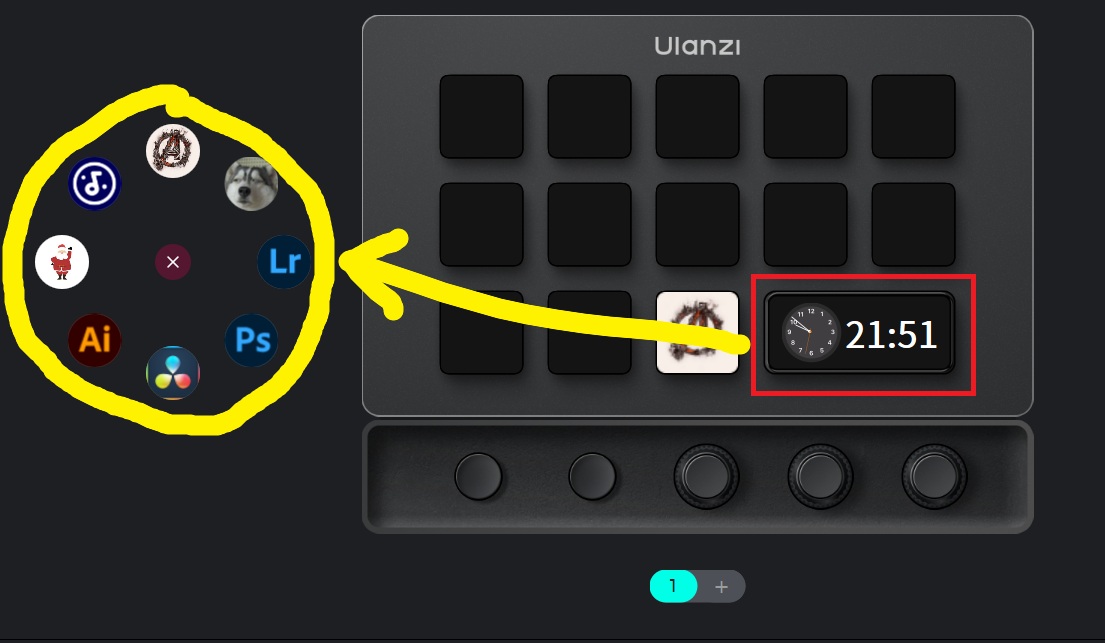
我使用的是优篮子D200X。我按设备右下角的预设切换按钮,会在电脑屏幕上显示一个圆圈让我选择预设,但是这个会有点别扭,设备上按完还要用鼠标再点一次。希望改成在设备上直接显示预设,然后按设备按键选择对应预设

屏幕截图 2026-05-10 215143.jpg

78

主题

325

回帖

1452

积分

管理员

积分
1452
发表于 2026-5-12 11:36:52 | 显示全部楼层
你好,弹窗切换主要是用于在桌面,或者其他界面,方便手动切换预设的场景。


可以将app绑定对应预设,即可实现打开app自动切换,具体设置参考链接如下:

https://bbs.ulanzistudio.com/for ... ;tid=133&extra=


0

主题

1

回帖

6

积分

新手上路

积分
6
发表于 2026-5-28 16:34:37 | 显示全部楼层
Ulanzi 发表于 2026-5-12 11:36
你好,弹窗切换主要是用于在桌面,或者其他界面,方便手动切换预设的场景。

我认为楼主说的很有必要。就算是软件自动切换配置,有时候会在某个软件操作界面期间想要切换到某个全局的配置,比如调取某些软件、打开某些网址之类的,都需要切换按钮配置,这时候如果可以直接在按钮上操作而不是动鼠标就比较方便

0

主题

4

回帖

50

积分

注册会员

积分
50
发表于 2026-5-29 20:03:31 | 显示全部楼层
There is one disgusting bug in all versions of the app. If you assign more than one command to the keyboard, but a keyboard shortcut (for example: shift+scroll up or down), then such a combined command will not work correctly. It will work as if each of the keyboard shortcut commands is executed separately and alternately, rather than together. Therefore, in the same Davinci Resolve or in Photoshop, it becomes impossible to control many operations by turning the knob.

Windows 11, 25H2
您需要登录后才可以回帖 登录 | 立即注册

本版积分规则

手机版|Ulanzi Studio论坛 ( 粤ICP备2024258515号-1 )

GMT+8, 2026-6-26 01:55 , Processed in 0.154939 second(s), 21 queries .

Powered by Discuz! X3.5

© 2001-2026 Discuz! Team.

快速回复 返回顶部 返回列表