|
Hi all — sharing a plugin I built. If you use Claude Code (Anthropic's CLI coding agent or Desktop) and tend to run several sessions at once, this turns your deck into a live status board so you can see, at a glance, which session needs your attention.
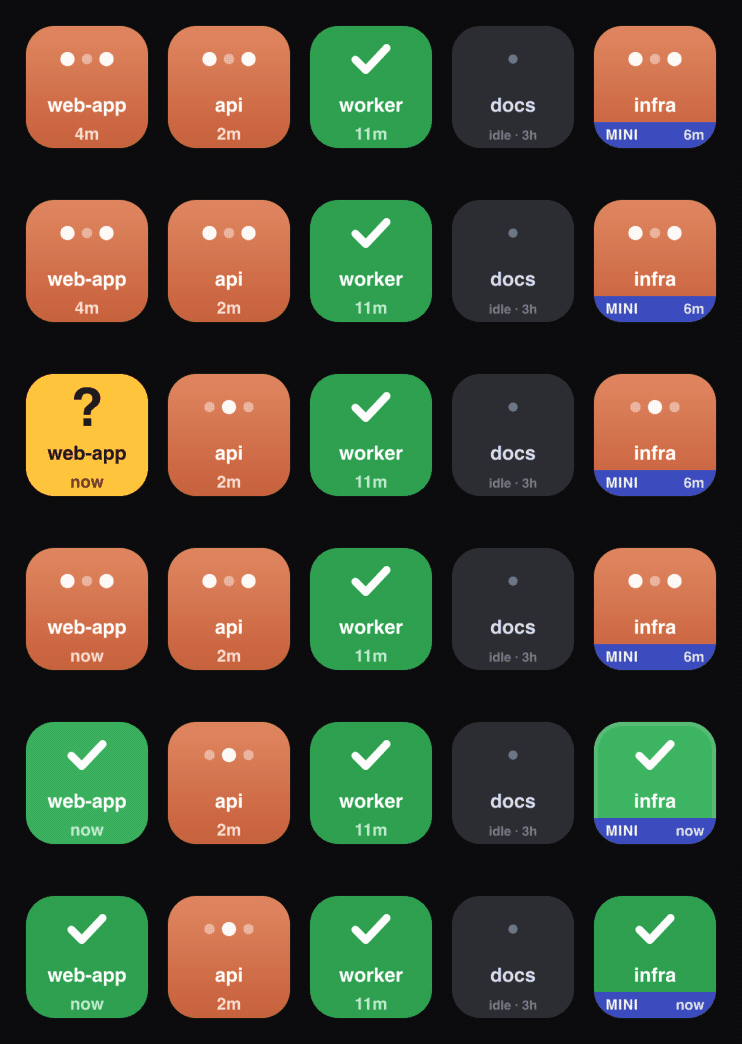
Each key tracks one session and changes color with its state: - 🟤 thinking — Claude's working (animated dots)
- 🟡 needs you — blocked waiting on your input (bold amber, tuned to catch your eye)
- 🟢 done — finished, ready to review
- 🔴 error — the turn hit an API error
Press a key to jump straight to that session; press-and-hold to clear it. There's also a web-board version that mirrors the deck in a browser window (add it to your dock), so it even works without the hardware.
Heads up: currently macOS only (it uses some Mac-specific APIs for the "jump to session" feature).
https://github.com/AnilRh/claude-sessions-deck
|  English
 简体中文
简体中文 繁體中文
繁體中文 한국 사람
한국 사람 日本語
日本語 Deutsch
 русский
 بالعربية
 TÜRKÇE
 português
 คนไทย
คนไทย french

 发表于 2026-7-27 05:26:31

 发表于 2026-7-27 12:17:18